| CONTENTS | GLOSSARY | SEARCH DOCUMENTATION |
PROPACEOS computes the properties of plasmas composed of one or more atomic elements. Elements are added or deleted from the plasma mixture using the Add and Delete buttons on the right side of the Plasma Elements widget.
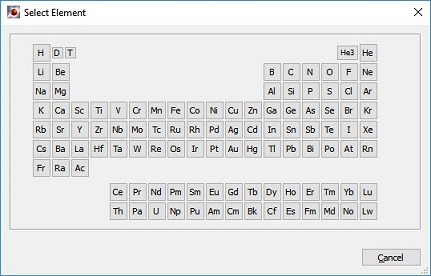
Elements are selected using the periodic table element selector shown below.
When an atomic element is added to the plasma, its characteristics (such as name, atomic number, and atomic weight) are automatically entered into the appropriate boxes of the setup widget (see below). An element may be changed by selecting the Modify button.
For a plasma composed of a mixture of elements, the number fraction for each element must be specified. Note that the number fractions will be automatically normalized to 1.0 when the simulation begins. (For example, for CH4 entering number fractions of 1 for C and 4 for H is the same as entering 0.2 for C and 0.8 for H.)
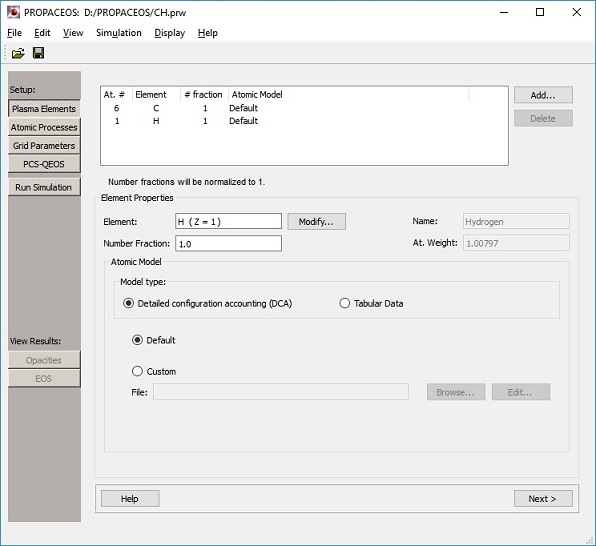
The user can also specify the atomic model for each element; i.e., a list of energy levels to be included in a calculation. PROPACEOS has been set up to utilize either pre-configured atomic models (the default) or custom atomic models set up by the user. The use of custom atomic models is intended for advanced users.
Users can view and edit the details of custom atomic models by pressing the Edit button. This launches the AtomicModelBuilder application, which shows the energy levels in the atomic model for a given atomic element and how they are collapsed.
Users can build their own atomic models using the AtomicModelBuilder application.The pre-configured atomic models are located in Atomic Database Library (i.e., a folder containing the atomic database). User's can specify the default location of this folder in the Preferences dialog.
| Copyright © 2024 Prism Computational Sciences, Inc. | PROPACEOS 10.0.0 |